The meeting ends. Everyone nods, gathers their things, and heads back to their desks. You look at your notes and realize you have a page of scribbles, half a sentence about a deadline, and a question mark next to someone’s name.
Who is doing what? By when? And what did the group actually decide, as opposed to simply talk about?
“Summarize my meeting notes” seems like a reasonable request for AI. It will probably give you a tidy recap. But a recap tells people what was discussed. A follow-up tells them what happens next.
Before asking AI to help, give it four details:
1. **Goal:** What should the follow-up accomplish?
2. **Context:** Who is reading it, and what kind of meeting was this?
3. **Source:** Which notes can AI use?
4. **Expectations:** What should the result look like, and what should AI do when something is missing?
This is **GCSE: Goal, Context, Source, Expectations**, the same four details that help with email. In a meeting follow-up, they do something extra. They push you to decide what you actually need to know.
## Start with what the meeting was supposed to produce
Most meetings are supposed to produce one of three things: a decision, a task, or an answer to an open question. That is your **Goal**.
“Summarize the meeting” is a format. “List what we decided, who owns each next step, and what is still undecided” is a purpose.
Next comes **Context**. Was this a quick check-in or a planning session? Who will read the follow-up: your team, your manager, or people who missed the meeting? These details help AI choose the right level of detail, but you know the room. You know who is likely to push back, which topics are sensitive, and what was only floated as an idea.
Then there is the **Source**. This is where the facts come from, and it matters more here than almost anywhere else. If your notes say “Sam to draft agenda,” AI can organize that. If your notes say nothing about a due date, AI should not supply one.
Finally, set **Expectations**. Ask for the format you need, such as a table with columns for the action, the owner, and the due date. Then tell AI what to do when something is missing. For example: “Write ‘Not stated’ instead of guessing.”
## See GCSE in action
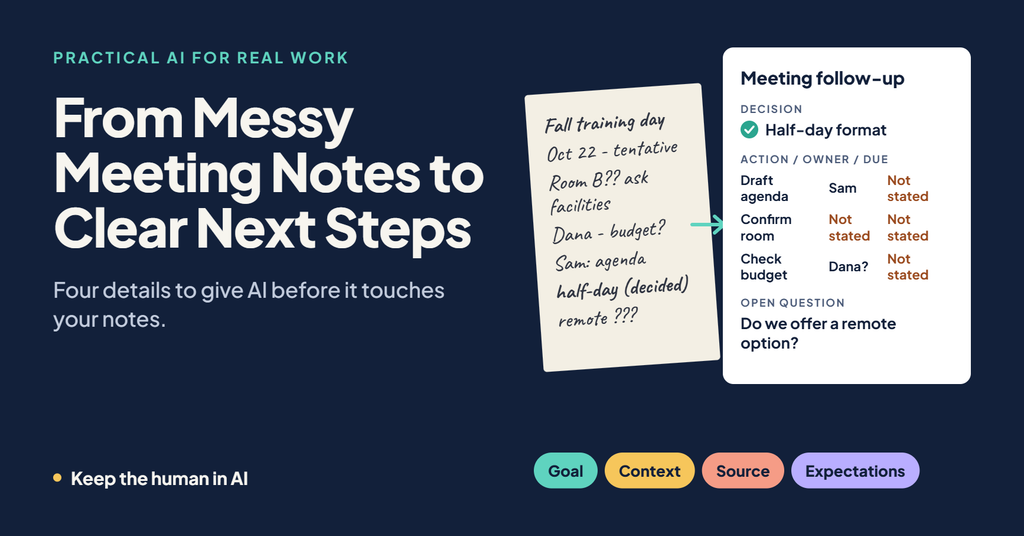
Here is a fictional example you can try. A small team met to plan a fall training day. Here are the rough notes:
> Fall training day. Oct 22 tentative. Room B probably, need to confirm with facilities. Dana to check catering budget? Sam said he’d draft agenda. Decided: half-day, not full day. Still unsure about remote option. Follow up next week.
The vague prompt is:
> Summarize my meeting notes.
A more useful prompt is:
> **Goal:** Turn my meeting notes into decisions, action items with owners and due dates, and open questions.
> **Context:** I am the coordinator for a small team planning a training day. This follow-up will go to the team.
> **Source:** [Paste the notes above]
> **Expectations:** Use three headings: Decisions, Action Items, and Open Questions. Put action items in a table with Action, Owner, and Due Date. If an owner or date is not stated in the notes, write “Not stated.” Do not invent decisions, names, or dates. Flag anything that seems uncertain.
The second prompt gives AI a job it can do well. It can separate the one clear decision (half-day format) from items that are still uncertain: the date is tentative, the room is only probable, Dana’s task has a question mark, and the remote option is unresolved. It has also been told what to do when the notes run out.
*This is a teaching example, not a recorded AI response.*
## A tidy list is not a confirmed commitment
Suppose the draft lists “Dana: confirm catering budget by Friday.” **You** need to check that. Your notes had a question mark, and no Friday deadline appeared anywhere. If that line goes out as written, you may have just assigned Dana a task she never agreed to, with a deadline nobody set.
This is why meeting follow-ups deserve a careful read. A well-organized list looks official. Once people see their names beside a task, it begins to feel agreed to.
Before sending, make three human checks:
– **Decisions:** Was each item actually decided, or only discussed?
– **Owners:** Did each person agree to the task, or did it just come up?
– **Dates:** Did anyone commit to this deadline, or did the draft fill the blank?
Then edit. Change anything that overstates what was settled. Move uncertain items to open questions. If a name or date is missing, ask the people involved rather than letting the draft decide.
A word on privacy: meeting notes often include names, opinions, and internal discussion that do not belong in every follow-up. Before pasting anything into an AI tool, follow your organization’s rules about approved tools and permitted information. If you have access to Microsoft 365 Copilot at work, check what your organization allows for meetings. The same four details apply either way.
## Keep the human in the follow-up
AI can organize your notes quickly. It cannot know what people really agreed to in the room, and it cannot take responsibility for what you send.
The next time a meeting ends, start with four questions: **What did this meeting need to produce? Who is this for? What do my notes actually say? What should the follow-up look like, and what should AI do when something is missing?** Then review the result as the person whose name is on the message.
Want a ready-made starting point? Try our prompt for converting meeting notes into decisions, owners, and deadlines, or use the free Build a Prompt tool to shape one for your own meeting. For the review step, read Before You Hit Send: Five Human Checks for an AI Draft. If you missed the starting point for GCSE, see Stop Asking AI to “Write an Email”: Give It These Four Details.
AI can help you sort the notes. You decide what the team actually agreed to.